Google Analytics 4 is now the default analytics environment for businesses that still want first-party website measurement. But many Malaysian businesses are still using GA4 as if it were Universal Analytics with a new interface. That is the core mistake.
GA4 uses an event-based data model, not the older session-first mindset many teams are still used to. When businesses install the tag, open a few reports, and stop there, they end up with a property that technically collects data but does not answer real business questions.
If GA4 is only measuring pageviews and generic engagement, it is not really measuring your business. It is only measuring that your website exists.
Why this matters more for Malaysian businesses
Many local businesses rely on lead-generation forms, WhatsApp contact flows, multi-domain websites, booking engines, payment gateways, or ecommerce checkouts that sit partly outside the main site. That means attribution quality matters. If your GA4 setup is weak, management ends up making channel decisions using incomplete or misleading data.
This is especially common in B2B, property, education, services, hospitality, and retail. Traffic volume may look healthy, but without the right events, key events, and referral controls, the business still cannot trust the numbers.
Where most GA4 setups go wrong
1. They assume pageviews are enough
GA4 automatically collects basic events such as automatically collected events, but that is only the baseline. A lead-based business needs to know when a user submits an enquiry, clicks a key CTA, completes a booking step, or triggers a high-intent action. An ecommerce business needs product, cart, and purchase measurement. A content business needs scroll depth or content-engagement events tied to business goals.
If you are only reviewing views, sessions, and traffic sources, you are missing the actions that actually matter.
2. They never define meaningful key events
In GA4, an event is just a recorded interaction. A key event is the action that actually matters to the success of the business. Many setups either mark too many events as important, or never mark the right ones at all.
For a lead-generation site, `generate_lead` is a strong example of a recommended event. For ecommerce, purchase events are critical. If your key events do not reflect what the business is trying to achieve, the rest of the reporting becomes strategically weak.
3. They migrated from Universal Analytics without redesigning measurement
This is one of the biggest GA4 mistakes. Teams often recreate familiar dashboards but never rethink the underlying measurement model. The result is a GA4 property that looks active but still does not map properly to the customer journey, the funnel, or the sales process.
GA4 is not just a new reporting interface. It changes how you define events, how you track important actions, and how you connect those actions to reporting and advertising.
4. Ecommerce or lead tracking is incomplete
Google documents clear ecommerce measurement and ecommerce event setup, but many sites never implement them fully. They may track a purchase but not product views, add-to-cart, or begin-checkout events. Lead-generation sites may log a thank-you pageview but not the actual form submission event.
If the important funnel steps are missing, the business cannot diagnose where users drop off. That means no meaningful optimisation.
5. Cross-domain and referral setup is wrong
Many Malaysian businesses use multiple domains or third-party steps in the customer journey: booking engines, payment processors, campaign landing domains, or subdomain-based portals. If cross-domain measurement is not configured properly, one user journey may be split into multiple users and sessions.
Similarly, if unwanted domains are not managed correctly, GA4 may show self-referrals or misleading traffic sources. Google provides controls for unwanted referrals, but many setups never use them.
6. Internal traffic and developer activity pollute the data
Another very common issue is testing in production without filtering. Marketing teams, internal staff, developers, and agencies all visit the site frequently. If that traffic is not excluded, reports become noisier than they should be.
Google provides a way to filter out internal traffic and a separate filter for developer traffic. But many businesses either never configure these filters or activate them without testing first, which creates a different risk. The safer approach is to validate the filter before making it active.
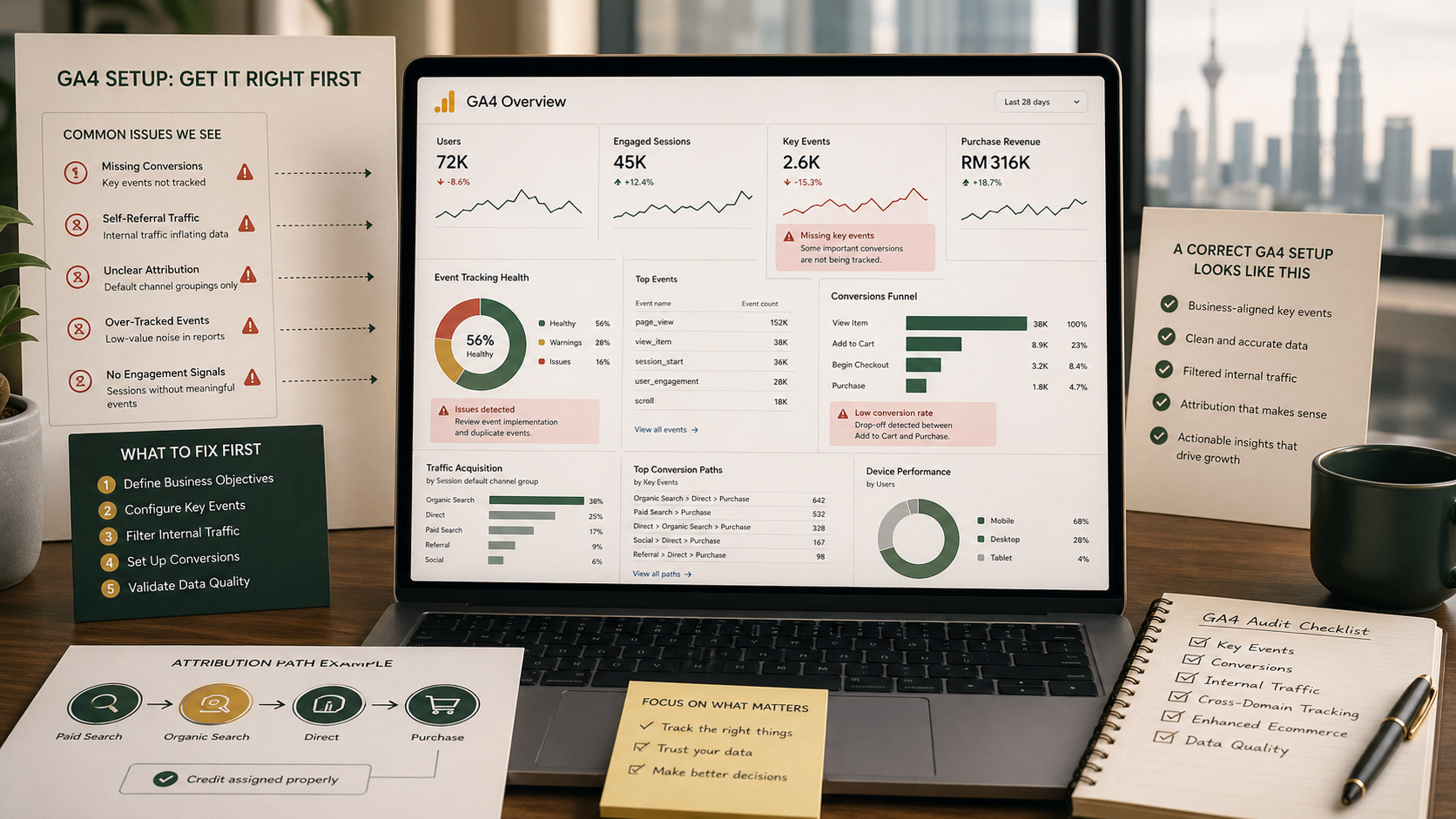
What to fix first in GA4
If your GA4 setup is uncertain, do not try to fix everything at once. Start with the parts that most directly affect business decision-making.
-
1Define the real business actions. Decide which actions actually matter: enquiries, bookings, purchases, quote requests, WhatsApp clicks, downloads, or application starts.
-
2Review your events. Check whether the actions above are being collected as events at all, and whether the naming is consistent with GA4's recommended structure.
-
3Mark the right key events. Not every event deserves special status. Focus on the few actions that reflect genuine business value.
-
4Audit cross-domain and referral setup. If the journey touches multiple domains or checkout steps, verify that attribution is not being broken in the middle.
-
5Test internal and developer filters carefully. Validate first, then activate. Once some filters are applied to incoming data, the effect is permanent.
-
6Rebuild reporting around decisions, not vanity metrics. Management should be able to see which channels, pages, or campaigns contribute to meaningful actions, not just traffic volume.
A practical GA4 checklist for Malaysian websites
For most sites, this is the minimum quality check worth running:
- Is the correct GA4 property and web stream installed everywhere?
- Are lead or ecommerce events implemented beyond default pageview tracking?
- Are the right events marked as key events?
- Is cross-domain measurement configured where needed?
- Are payment, booking, or external process domains handled correctly?
- Is internal traffic filtered using a tested method?
- Can the business connect GA4 reports to actual revenue, leads, or operational outcomes?
If the answer to several of these is no, the issue is probably not reporting. It is measurement design.
What good GA4 setup actually looks like
A good GA4 setup is not the one with the most charts. It is the one that lets a business answer practical questions with confidence. Which channels drive qualified leads? Which campaigns produce real purchases? Where do users drop out of the booking journey? Which landing pages drive intent, not just visits?
Once measurement is structured correctly, GA4 becomes much more useful. It stops being a dashboard people glance at occasionally and starts becoming a system the business can use to make decisions.
If your team is also reviewing dashboard or reporting needs beyond GA4, the problem may not end at analytics setup alone. In many cases, the deeper issue is not only tracking quality, but whether the business has a proper reporting structure around the data once it is collected. That distinction becomes clearer in our article on dashboards versus reporting systems.
This article provides general information only and should not be treated as legal, technical, or advertising advice. Every GA4 setup should be reviewed according to the website structure, business model, consent requirements, and reporting objectives involved.